
TextMate Theme & Key Bindings For Xcode
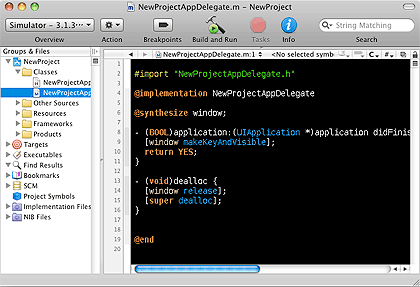 I've been using Xcode for about 8 hard core months now and for all this time I have been using a theme I made that mimics the All Hallow's Eve TextMate theme with a bunch of custom key bindings that make Xcode more TextMate compatible. Here are links to download both below and a few notes I have put together. As I remember more of what I have actually done, this post will get updated. I do remember the first thing I did with Xcode for almost 3 days was just to customize the heck out of it and these files are the results.
To use these download and unzip them. Please the theme in ~/Library/Application Support/Xcode/Color Themes and place the bindings in ~/Library/Application Support/Xcode/Key Bindings. That should be it. Hare are my notes for now on what the key bindings do.
Misc Key Bindings
- Command-W - Works on a file! Not the whole project window!
- Command-1 - Open File List
- Command-2 - Method List
TextMate Style Key Bindings
- Command-T - for Open Quickly
- I'll update this as I find more, it has honestly been so long I forget all the work I've done and just use this now as if it were TextMate.